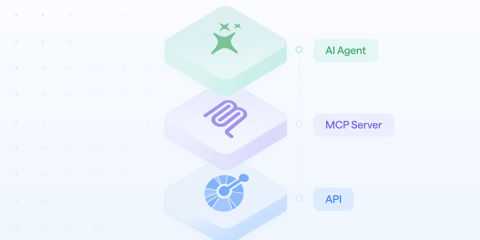
When we launched the Bump.sh MCP Platform earlier this year, the pitch was simple: create a production-ready MCP server in minutes by simply uploading a workflow definition. No code, no infrastructure to maintain. As easy as creating API documentation from an OpenAPI file.
When we started thinking about publishing our own MCP server for API docs, using our platform and “eating our own dog food” was an obvious choice.
This post is a breakdown of how we did it and what we learned building an MCP server for API documentation portals, using our own tools.
Why would API docs need an MCP server?
We’re still figuring out what documenting an API means in a world of agents and LLMs. We shipped a Markdown version of our docs, then added support for llms.txt. We saw a real shift in API discovery over the last few months: more and more developers discover and integrate APIs without ever leaving their AI-powered IDEs.
- Best case scenario: the AI tool has seen that documentation during training, or manages to access the documentation online. It’s ineffective, token-intensive, and leaves the door open to hallucinations.
- Worst case scenario: it confidently makes something up.
Autonomous AI agents are facing the same issues.
We don’t know if MCP will be the definitive answer, but MCP is currently widely used by developers, so it’s a new step in that direction. Our goal stays the same: to make our clients’ docs available where their own clients are.
It all starts with one question: what will this MCP server be used for?
What mattered to us was exposing only the bare minimum in terms of tools. A bloated tool list leads to an LLM that loses focus, picks the wrong tool, and wastes tokens trying to figure out what to call. Sebastien detailed the best practices for an efficient MCP server in a recent blog post.
We identified three recurring situations where a human or an agent needs to query an API documentation, based on conversations with customers and from our own experience using APIs:
- I’m a new user of an API and want to understand its capabilities at a high level. What can this API do? Where do I start?
- I want to know if the API supports a specific use case. Does it allow me to do X? Is there an endpoint for Y?
- I’m implementing a specific endpoint and need the details. What are the exact parameters? What does the response look like? Are there edge cases I should handle?
All of these questions can be asked directly by a human through an LLM, or triggered and acted upon autonomously by an AI agent, using the MCP server’s tools:
list_pages: explore a documentation structure and have a high-level understanding of the API capabilities.search: find relevant pages by keyword or natural language query, with optional filtering by type (operation, schema, topic, etc.).get_pages: retrieve the full content of any page in a clean, token-friendly format.
We wrote a Flower definition (Bump’s lightweight workflow specification) that describes these 3 workflows/tools: the HTTP calls to make, and what to extract from the response.
The Bump MCP Platform handles the rest: running the server, managing connections, and exposing the tools to AI agents through the MCP protocol.
Here’s a simplified version of what the search flow looks like:
flows:
  - id: search
    description: >
      Search across all documentation pages in the portal by keyword.
    inputs:
      properties:
        query:
          type: string
        type:
          type: string
          enum: [api, operation, schema, topic, ...]
      required:
        - query

    steps:
      - id: call_search
        request:
          method: GET
          url: bump-api-url
          headers:
            ...
          query:
            query: $inputs.query
            type: $inputs.type
        outputs:
          results: $response.body.data
          total: $response.body.metadata.total
One MCP server for all Bump.sh doc portals
A naive implementation would be to provide a single MCP server exposing all Bump.sh docs. That’s actually a terrible idea: if an agent is helping a developer integrate Stripe’s payment API, it doesn’t need to search across every API on our platform. It needs to search that specific API. A scoped server reduces noise, improves search relevance, and makes the agent far more useful.
On the other hand, as every doc MCP server runs the same tools, building one MCP server for each one wouldn’t make sense, infrastructure-wise.
Our solution stands right in the middle: every MCP server request to the Portal API must declare which documentation portal it’s querying via an HTTP header. But here’s the thing: you can’t ask an API consumer to add a custom HTTP header every time they add an MCP server: he doesn’t care about Bump.sh or our technical choices (and he shouldn’t!).
We solved it at the infrastructure level. Documentation already have their own URLs, either a Bump.sh URL or their own custom domain. We only had to create a new /mcp path for each doc. When an API consumer hits the doc MCP server using this URL, Cloudflare injects the right header before forwarding it to our MCP server.
Thanks to this trick, every documentation portal, whether a single API or a full hub, gets its own MCP server at {doc-or-hub-url}/mcp. The scoping is invisible to the user.
Building the right API for these tools
As we didn’t have an API to expose API docs, we used this opportunity to create the Portal API. The API holds the business logic, returns structured data, and the MCP server provides the UI.
We decided to build it that way because it opens the door to headless API docs. If API discovery happens more and more outside of API docs, what’s the right way to provide it? Our true goal has always been to help devs work and collaborate around APIs. Traditional API doc portals are one way of achieving it. MCP servers are another. But our clients know best what specific needs their own clients have. That’s why we decided to make this API public, allowing our clients to build custom/tailored tools using a headless version of the doc portal they already have, without any extra cost.
The API exposes three endpoints, each with a precise purpose:
GET /list: to list all the child pages of a hub or a doc. Useful for exploration: start at the top of a hub, drill down into a specific API, then into individual operations. It helps understand the global purpose of a doc portal.GET /search: to search for a keyword or a sentence across all documentation pages in a portal. It only returns the 20 most relevant results, each with its URL, title, type, and a relevant text excerpt that helps the AI tool decide if it’s useful for its use case.GET /fetch: to retrieve the actual content of a doc, in Markdown format. This is where AI tools read the actual documentation.
Together, these three tools give AI tools everything it needs to navigate an API documentation portal the way a developer would: search for something, browse what’s available, then read and execute.
Spoiler: it’s documented on Bump.sh, if you want to give it a try!
How to get AI tools to use the MCP server?
Having a working MCP server is only half the battle. You still need users to add it to their tools. This is where we see the paint is still fresh regarding MCP support. Different AI tools handle MCP server configuration in very different ways:
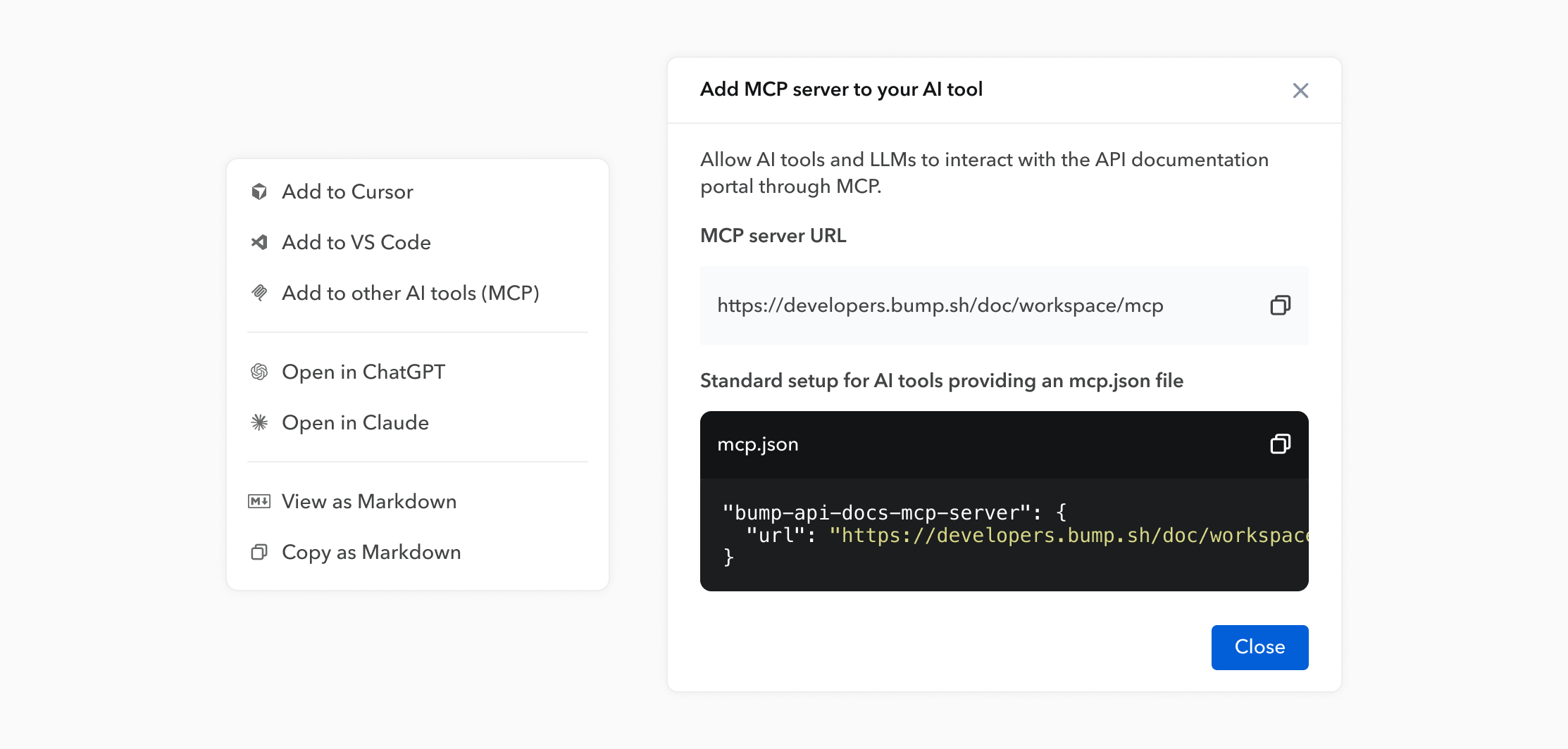
- Cursor and VS Code have the best implementation. They both support one-click installation via deeplinks: we generate a URL that encodes the MCP server configuration as a hash, and clicking it automatically adds the server to the IDE. That’s what the “Add to Cursor” and “Add to VS Code” buttons in our docs do. Easy!
- Claude and ChatGPT support MCP servers through their connector settings, but require users to manually enter the server URL. It’s a handful of clicks, not one, and users need to know where to look.
Most of the other tools use a configuration file, usually named mcp.json or something similar, where you define your MCP servers as JSON.
To ensure we provide developers with an easy way to add the MCP server, regardless of the tool they’re using, quick setup links have been added to the API docs.
Our target audience is developers, so that initial friction shouldn’t have much of an impact on doc MCP servers. The ones meant for less technical profiles are another story. Discussions with clients using our MCP Platform show that providing an AI chatbot using MCP servers under the hood is probably the best solution. Customers get a tailored experience inside a product they are already used to. Old-fashioned dashboards and conversational UIs are probably meant to live together, at least for a while.
What we learned
Some things stood out from this project:
- Designing for AI tools forces better API design. The discipline of asking “what does an AI tool actually need?” pushed us to be much more deliberate about response structure, payload size, and semantic clarity.
- Eating your own dog food is underrated. We went from “this is our platform for customers” to “we’re running the same stack ourselves” in a way that immediately surfaced real friction points we hadn’t noticed. We fixed several things in the Flower spec based on the experience of being our own user.
What’s next
The docs MCP server is currently available for public documentation portals. Support for private documentation is on the roadmap.
For now, every public API documentation hosted on Bump.sh has an MCP server available at {doc-or-hub-url}/mcp. If you’re building with AI tools, it’s one click away.