Over the past few months, I’ve seen more and more posts claiming that MCP is dead, with many developers advocating for the Skills + CLI combo instead. This is a misunderstanding. The Skills + CLI approach is fantastic for developers. But when it comes to exposing your product capabilities to end users through AI assistants, MCP remains the best option.
Yet, it has earned a bad reputation for one particular reason: context bloat.
Every MCP server adds information to the model’s context before it’s even used. A Claude user measured that just seven MCP servers consumed more than 67,000 tokens of tool definitions before the first prompt was even entered. The GitHub MCP server alone accounted for nearly 18,000 tokens across only 27 tools.
But let’s be clear: the problem isn’t MCP. It’s how we build MCP servers.
Context bloat isn’t an unavoidable consequence of MCP. It’s mostly the result of design decisions: exposing too many tools, writing verbose descriptions, returning oversized payloads, or simply treating an MCP server like an API instead of what it really is: a user interface for an LLM.
By carefully designing your server, you can dramatically reduce its token footprint while improving reliability, usability, and the overall experience for both users and AI agents.
In this article, I’ll share four practical rules we’ve learned while building MCP servers that stay lightweight, reduce context usage, and help LLMs consistently make better decisions.
MCP is a UI: design it like a UI
In many discussions I’ve had with people exploring MCP, I noticed the same pattern over and over again: they were aiming to turn their existing API into an MCP server by simply exposing one tool per endpoint.
The result was always the same: it kind of worked. But that “kind of” is exactly why these projects stayed as POCs and never made it to production.
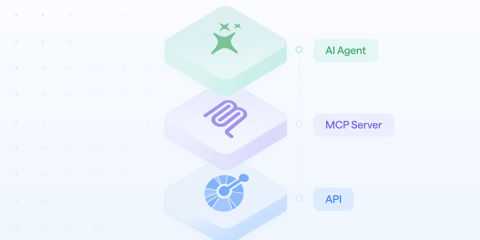
An API is not designed for end users. It is built to be the perfect abstraction layer between an application and a database (or any backend service). MCP is the opposite. MCP is built for end users. Whether the consumer is an agent or a human using a language model, they do not care about your data model or your internal systems: they simply want to accomplish a task using the tool you expose: your MCP server.
This means MCP is a user interface, and it should be designed as one.
Don’t start from your API and ask yourself what you should expose. Start from your users and ask:
- What do they want to achieve?
- How will they ask for it?
- What information do they need to provide?
- What information should the system return?
From these questions, the structure of your MCP server starts to appear:
- User intentions become your tools.
- The way users ask becomes your prompt examples.
- Required information becomes your input schemas.
- Returned information becomes your outputs.
Once you have that foundation, you can think about implementation details: which endpoints to call, which operations to perform, which validations and transformations are needed, and so on.
If this is your first MCP server, keep the scope small. Start with a read-only use case, build it, and test it with an LLM as quickly as possible.
This will help you iterate and learn how to structure your server so it works efficiently.
Limit the number of tools, and optimize them
Claiming that MCP is completely broken and wrecks the context window is plain nonsense (I’ll probably write another article about that), but it is still important to understand what happens under the hood.
For every interaction, models receive the list of available tools, their descriptions, and their input schemas. This is how they decide which tools to use and when.
Currently, this means that the more tools you expose, the larger the initial context becomes before the user even sends their first message. Even if they are simply asking ChatGPT to write a Father’s Day poem. (By the way, don’t do that. Ever. Please.) You should keep that tools number as low as possible.
This is no longer entirely true in Claude Code since January 2026. Lazy loading is now enabled by default: tool definitions are deferred rather than loaded into context upfront, and Claude searches for the relevant ones only when a task needs them (see the Claude Code MCP docs). It is likely that most AI tools will adopt a similar mechanism soon.
The first rule already points you in the right direction. Instead of exposing one tool to retrieve a customer, another to generate an invoice, and a third one to download the PDF, expose a single tool: generate_invoice_and_get_pdf_link.
One tool instead of three is already better. But you can go further.
In this example, the tool name is extremely explicit. You immediately understand that it will generate an invoice and return a link to the document. This is really important: tool names are one of the strongest signals models rely on. A good name reduces ambiguity and increases the chances that the model picks the right tool on the first attempt.
The same principle applies to input schemas. LLMs generally perform better with simple, flat parameters than with deeply nested structures. Every additional level increases complexity and the risk of mistakes.
Prefer this:
{
  "customer_id": "cus_123",
  "currency": "EUR",
  "due_date": "2026-08-15"
}
Over this:
{
  "invoice": {
    "customer": {
      "id": "cus_123"
    },
    "settings": {
      "currency": "EUR",
      "due_date": "2026-08-15"
    }
  }
}
A flat schema is usually easier for the model to understand, consumes fewer tokens, and produces better results.
But let’s be clear here: even with these best practices, your tool catalog will naturally grow over time. At some point, that growth will start hurting the overall experience of your MCP server.
Aim to keep each server below 15 to 20 tools whenever possible..
If you need more than that, pay very close attention to tool names and descriptions. Avoid overlap at all costs. If two tools seem capable of solving the same problem, the model must decide between them, which increases the risk of mistakes.
And don’t hesitate to split your tools across multiple MCP servers. This gives users the ability to pick only the pieces they actually need.
Instructions are context
By now you’ve probably understood the pattern: everything that enters your users’ context should be optimized in size and quality. This includes the instructions of your MCP server, both globally and for each individual tool. They need to be as efficient as possible.
A few simple rules usually help:
- Don’t repeat yourself: if information is already in the tool name, don’t repeat it in the description; if something is explained globally, don’t repeat it in every tool.
- Use imperative sentences.
- Be concrete: prefer specific instructions over vague adjectives like “fast” or “smart”.
- Document defaults and edge cases, so the model knows what happens when an argument is missing.
For example:
Generate the invoice for the current user for the given date. If no date is provided, use today by default.
Your goal is simple: someone who knows nothing about your product should be able to understand what your MCP server can do just by reading the tool names and descriptions. And they should never get stuck.
Outputs play a big role here too. If one of your tools fails, the error message can be extremely valuable for the LLM. Don’t return something like:
{
  "error": "customer_not_found"
}
Return guidance instead:
{
  "error": "customer_not_found",
  "message": "No customer matches the id 'cus_123'. Call search_customers with the customer name or email to find the correct id, then retry generate_invoice_and_get_pdf_link."
}
We should do this in every application and every API error message. And yet…
Filter the outputs
Let’s be honest: we’ve spent years optimizing REST APIs in the wrong direction.
Most API responses are designed to be as exhaustive as possible, hoping that developers will never miss any information (that was actually one of the reasons behind GraphQL’s success, as you only fetch the data you need)…
With LLMs, every response returned by your MCP server may become part of the user’s context. If your MCP server is only acting as a proxy between your API and the model, you can easily end up returning massive payloads that are completely unnecessary.
{
  "id": "usr_001",
  "first_name": "Luke",
  "last_name": "Skywalker",
  "email": "luke@rebels.org",
  "created_at": "1977-05-25T00:00:00Z",
  "updated_at": "2026-06-24T09:12:43Z",
  "status": "active",
  "email_verified": true,
  "locale": "en-US",
  "timezone": "Galactic/Tatooine",
  "avatar_url": "https://cdn.rebels.org/avatars/usr_001.png",
  "phone": "+1-555-0101",
  "title": "Jedi Knight",
  "address": {
    "street": "Moisture Farm 7",
    "city": "Mos Eisley",
    "region": "Tatooine",
    "postal_code": "00001",
    "country": "Outer Rim"
  },
  "preferences": {
    "newsletter": false,
    "theme": "dark",
    "notifications": { "email": true, "sms": false, "push": true }
  },
  "metadata": {
    "source": "import",
    "tags": ["founder", "pilot"],
    "internal_score": 87
  }
}
When in reality you only need:
{
  "id": "usr_001",
  "name": "Luke Skywalker",
  "email": "luke@rebels.org"
}
A standard API response can easily contain 50+ fields while the agent only needs 3 to 5 pieces of information to continue. Filtering at the source can reduce token usage by more than 80%. In the example above, the payload drops from 802 to 79 characters, a 90% reduction, just by keeping the three fields the agent actually needs.
You should aggressively filter the data you return.
During the design phase, ask yourself what information is actually needed to answer the user’s question and return only that.
There are many tools available to filter JSON data. My favorite is JMESPath: it not only filters data but also allows transformations using a relatively simple syntax. At least compared to JSONPath (did I already mention that I hate JSONPath?).
// JMESPath example
{id: id, name: join(' ', [first_name, last_name]), email: email}
The impact can be enormous. In our example, the response size was divided by 10. Imagine what that means across every request, for every user, on every MCP server in the world.
Start building efficient MCP servers
If I had to summarize everything in one idea, it would be this: treat your MCP server as a product with its own UI, not as an extension of your API. Its usability and performance are the two main factors that will determine adoption and success.
By limiting the number of tools, you force yourself to focus on what really matters and remove everything that isn’t essential. You keep the server simple.
By optimizing descriptions, you improve tool discoverability while reducing context usage.
By filtering outputs and hiding implementation chains from the LLM, you improve performance and reduce token consumption even further.
Ultimately, every unnecessary token competes with your user’s prompt. The less noise you add, the better the model can focus on what actually matters.
One final piece of advice: test and iterate quickly. Until your server is actually in the hands of an LLM or an agent, you have no idea how it will behave. Will it call the right tool? Will it provide the correct parameters? Are default values applied correctly? What UI does the client generate? And so on.
Fortunately, building and iterating on MCP servers doesn’t have to require hundreds or thousands of lines of code. The faster your feedback loop is, the faster you’ll discover what actually works.
That’s exactly why we built Bump.sh. It lets you describe and publish efficient MCP servers in just a few minutes. Every iteration is instant: update your definition and immediately test how the LLM behaves. Feel free to reach out if you’d like to discuss it.